Error 9 means the manipulator (the arm that moves the cup) lost its position or hit an obstacle. Most cases reset cleanly with one button — but if it keeps coming back, you’ll need to check what’s blocking it inside the machine.
What it means
Three common causes:
- Positioning failure — the manipulator lost its reference point, often after a power glitch or interrupted cycle.
- Mechanical issue — backlash in the arm, a loose mounting bolt, or a worn motor.
- External interference — items stored inside the machine (extra powder bags, large water canisters) blocking the arm path. Or a customer pushing the manipulator while the machine is running.
Quick fix
- Open the machine and clear the area around the manipulator — remove any stored items, oversized water tank, or anything else that could block movement.
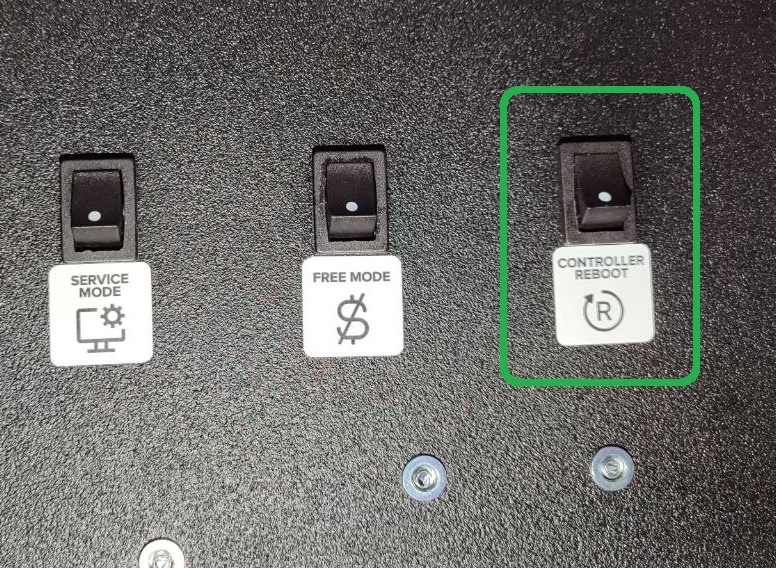
- Press the CONTROLLER REBOOT button. After restart, the manipulator returns to the cup window (default position).
- Run a test drink and watch the manipulator: it should align cleanly with the cup window and the dispensing hoses without overshooting or stopping mid-way.
If it keeps coming back
If Error 9 reappears after a reset and you’ve ruled out items inside the machine, the issue is likely mechanical. Common signs and what they usually mean:
- Manipulator overshoots or doesn’t reach the cup window cleanly — positioning steps need adjusting. Contact support, this is a guided procedure.
- Arm moves in jerks or stops mid-cycle — backlash or worn motor. Open the arm cover, check the mounting bolt, listen to the motor sound during a test cycle. If sound is uneven, the motor needs replacement.
- Manipulator doesn’t move at all — first check that the “Hand module” option is enabled in the service menu. If it is, the fuse on the arm board (ZH101 1A) likely needs replacement.
Send a short video of the symptom to support@ishakerusa.com and we’ll guide the next step.