Error 11 on Touch 2 means the output window curtain (the small motorized cover behind the dispensing window) didn’t open or close as expected. Most cases reset with one button — if not, you’ll need to check the position sensors behind the door panel.
What it means
The curtain is a small motorized panel that opens to let the cup out and closes after the drink is delivered. Error 11 fires when the curtain mechanism doesn’t reach the expected open or closed position. Common triggers:
- Cup or debris blocking the curtain path.
- One of the position sensors is misaligned or has failed.
- The curtain rail is jammed.
Note: in the telemetry app this is sometimes shown as “no cups” — that wording is misleading; the underlying error is the curtain, not stock.
Quick fix
- Open the dispensing window and check for a stuck cup, paper, or any debris on the curtain or rail. Clear anything you find.
- Press the CONTROLLER REBOOT button to clear the error.
- Test the mechanism: press SERVICE MODE (curtain opens). Close the service menu and confirm the curtain closes completely with no obstruction.
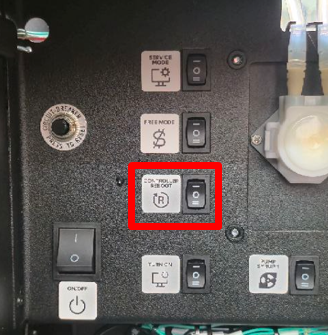
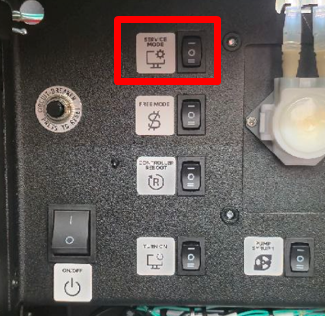
If it keeps coming back
If Error 11 returns after a reset, the position sensors need to be checked. The sensors sit behind the inner door cover — three Phillips screws hold the cover in place:
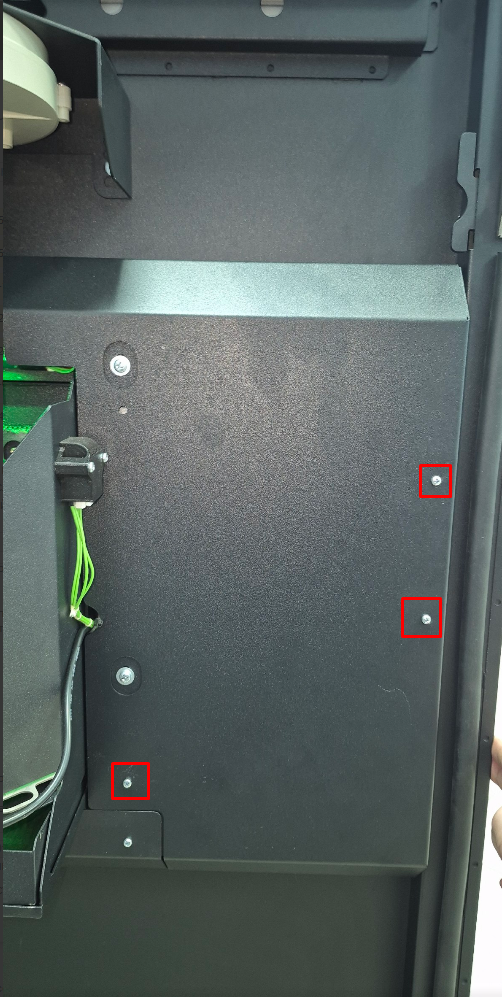
Once the cover is off, the sensors are visible on the inside of the rail. The lower sensor controls the closed position; the upper sensor controls the open position. If the curtain stops in either position, the corresponding sensor will glow red:
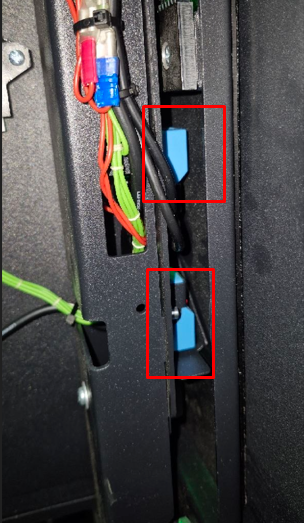
Press SERVICE MODE to open the curtain and FREE MODE to close it. The mechanism should move smoothly without jerks or stops. If you see uneven movement or a stuck sensor, send a short video to support@ishakerusa.com — we’ll guide replacement.