Adding your own powder / flavor
You do some steps yourself; registering a brand-new product goes through us.
What you do yourself
If the flavor is already in the machine catalog: assign it to a slot, set the price and dosage, and calibrate the slot. To assign a flavor see New flavor doesn’t appear after “Update Database”; to calibrate see Powder dose is wrong (set 30 g, get 15 g).
What you send us
If the product or brand is not in the system yet, we register it and add the icon/name. Please send:
- a photo of the front of the container;
- a photo of the supplement / nutrition facts panel;
- the brand and the exact flavor name.
After we register it, the product appears in your catalog and you can assign it to a slot.
After it is added — on the machine
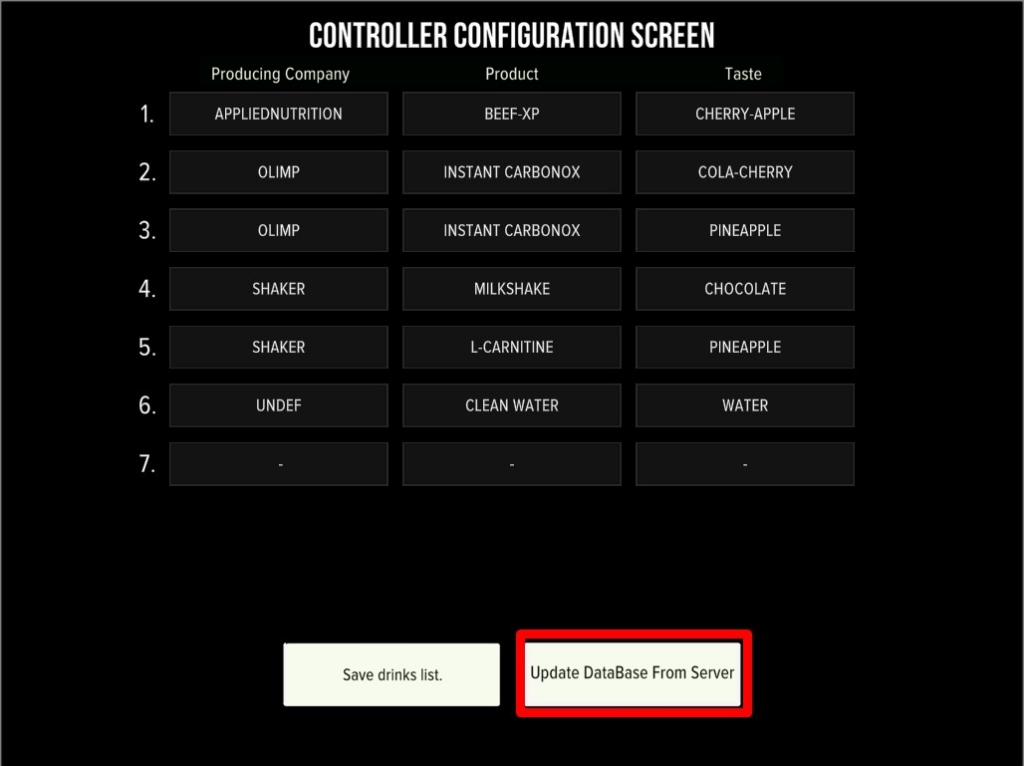
- Service Mode → Configurator → Change Drinks → Update Database From Server.
- Assign the flavor to the slot → Save.
- Controller Reboot.
- Calibrate the slot (see the calibration page).
If the flavor shows as “taste.xxx” or a white square, the icon/name hasn’t synced yet. Message us and we’ll fix it; a second Update Database after our fix usually resolves it.