Reasons for appearance:
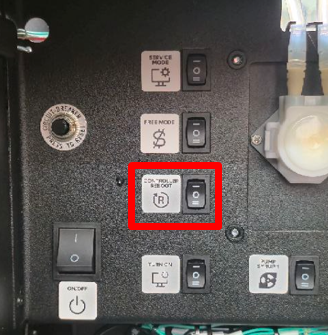
To reset the error, press CONTROLLER REBOOT. After rebooting, the handle will return to its default position above the drain funnel.
Error 9 may occur due to external factors, such as interference with the movement of the vending machine. If you store food, consumables, or use a large water container inside the vending machine, ensure that they do not interfere with the movement of the vending machine.
To check the mechanism's operation, open the machine's service menu, press the “Developer Mode” button, and go to the “Configurator” tab - “Engineering Menu.” Press the “Arm Test” button and, with the door open, check that the arm moves freely from the drain funnel to the beverage dispenser.