Error 9 on Touch 2 means the manipulator (the arm that moves between the drain funnel and the cup) hit an obstacle or lost its position. Most cases reset cleanly with one button.
What it means
- Mechanical issue — backlash in the arm or a worn motor.
- External interference — items stored inside the machine (extra powder, large water containers) blocking the arm path during a movement cycle.
Quick fix
- Open the machine and clear the area around the manipulator. Remove any stored items, oversized containers, or anything else in the arm’s path.
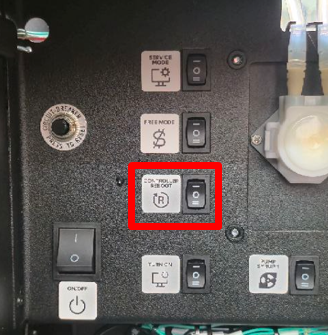
- Press the CONTROLLER REBOOT button. After restart, the manipulator returns to its default position above the drain funnel.
- Run a test drink and confirm the manipulator moves smoothly from the drain funnel to the dispensing position.
Diagnostic test
To verify the arm is working freely, run the built-in arm test:
- Open the service menu, tap Developer Mode.
- Go to Configurator → Engineering Menu.
- Tap Hand test and watch the manipulator with the door open.
- The arm should move smoothly from the drain funnel to the drink-dispensing position without stops or jerks.
If the arm doesn’t move at all, jerks, or stops mid-cycle — record a short video and send it to support@ishakerusa.com. The fix usually involves checking arm mounting, motor wiring, or the arm board fuse.