Connecting Syrups (Liquid Concentrates) — Shaker S
How to connect liquid concentrate (syrup) containers on the Shaker S, prime the lines and add syrup-based drinks to your menu.
Before you start
- The syrup system is optional. Your Shaker S works fully on powders and water only — if you don’t plan to sell syrup-based drinks, simply leave the syrup connectors unused.
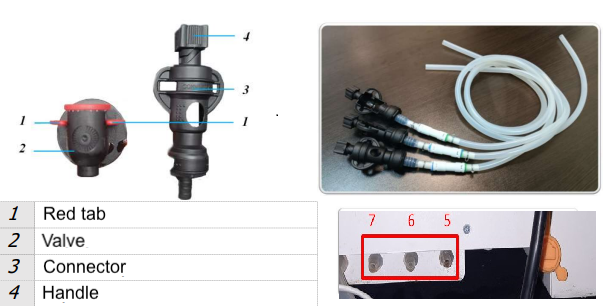
- The machine has 4 powder containers (positions 1–4) and 3 syrup lines (positions 5–7).
- Syrup lines and the water line are separate. Identify them by the labels on the control panel: PUMP SYRUP buttons belong to the syrup system, WATER SUPPLY belongs to water.
- Use standard liquid concentrates (syrups) intended for vending and beverage dispensing.
Connecting a concentrate container
- Take the concentrate container (bag-in-box or similar) out of its cardboard box.
- Push the connector onto the container valve and turn the connector handle clockwise until it stops. The red tabs on the valve should move to the lower position — concentrate will start entering the hose.
- Place the container as high as possible inside the machine. This prevents the liquid from draining back down the hoses between drinks.
Priming the lines
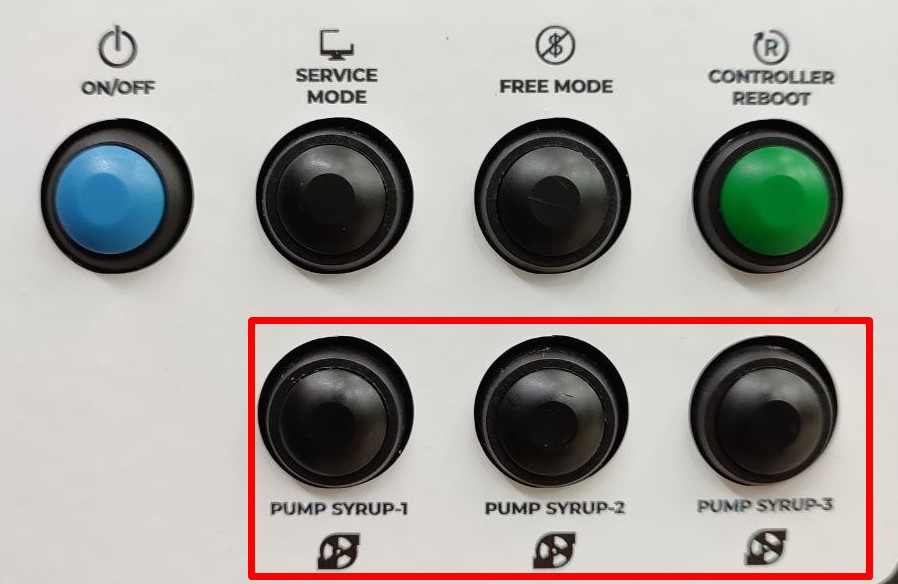
After connecting a container, the hose between the container and the mixer is still full of air. Press and hold the PUMP SYRUP button for the corresponding line on the door panel until concentrate comes out of the dispensing hose. The line is now primed.
Adding syrup drinks to the menu
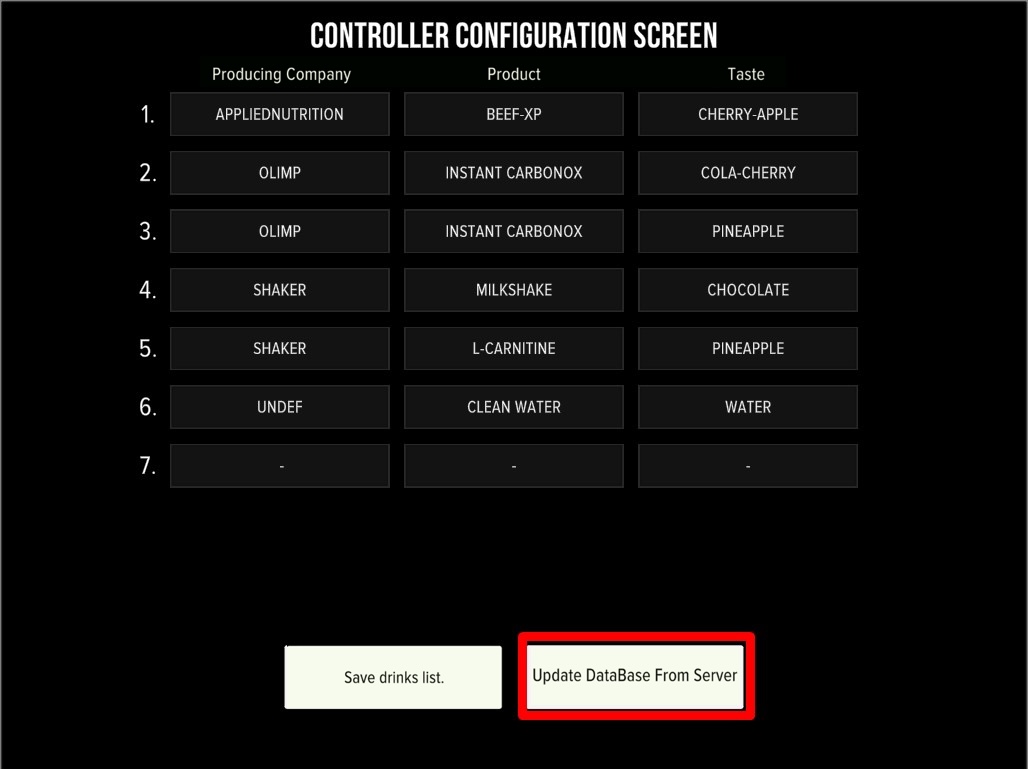
- Press SERVICE MODE and open Developer mode → Configurator.
- Tap Change drinks. Syrup positions are 5–7 (powder containers are 1–4).
- Pick the producing company, product and taste for each syrup position. If your product is not in the list, tap Update DataBase From Server (the machine must be connected to telemetry).
- Save the drinks list.
Prices, dosages and calibration
Before putting new syrup drinks on sale, set their prices and dosages and calibrate the dispensing — see the step-by-step guide: Adjusting the amount of water and powder. After everything is set, update the product remains in the Service Menu according to how much concentrate is actually in the container.
FAQ
Can the machine work without syrups, on water and powder only?
Yes. The syrup system is an optional add-on. All powder drinks work exactly the same whether syrup lines are connected or not.
How do I tell the syrup connectors from the water connector?
By the labels: syrup lines are operated by the PUMP SYRUP controls; the water inlet is marked WATER SUPPLY. If a connector is not in use, leave its cap in place.
The hoses seem empty after I replaced a container — is that a problem?
That’s expected: prime the line again with the PUMP SYRUP control until concentrate flows, then continue as usual.